
Super User Training Instructions
Epic Journey Badging
In the coming weeks, you will receive your Epic Journey badge. This badge is meant to help clearly identify you as part of the project team while you are supporting go-live activities in our hospitals and clinics.
We ask that you wear this badge over your regular UAB or affiliate badge so that employees, patients, and visitors can easily recognize your role. While the badge will work at time clocks, it’s important to note that it does not provide any additional system or security access—it simply helps with identification and time tracking.
For many of our UAB St. Vincent’s team members, we will be using your existing badge photo. For others, you will receive a separate email with simple instructions on how to submit a photo. We will distribute badges during Epic orientation sessions and at designated locations, with more details coming soon.
Frequently Asked Questions
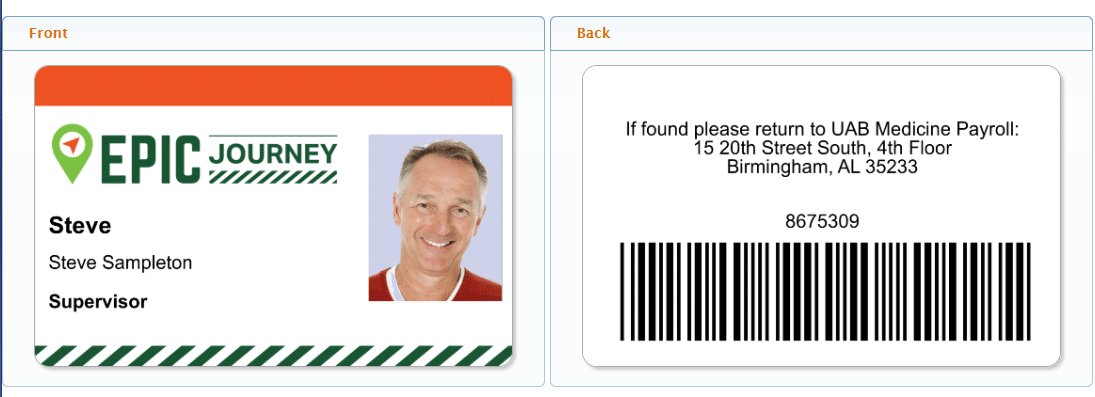
Below is a sample badge. Your title would be Super User.
Time Tracking – What to Expect
Super Users fall into the following groups:
- Group A: Contracted Personnel
(e.g., LabCorp, TouchPoint, Guidehouse, including UAB/LLC/HSF/STV employees leased back to Guidehouse) - Group B: UAB/UAB Medicine Employees
(e.g., UAB Payroll Services, UAB LLC Hospital, UAB St. Vincent’s, UA Health Services Foundation, UAB Medicine Enterprise, Cooper Green Mercy) - Group C: Affiliated Employees
(e.g., MedWest, University of Alabama, or other partner entities)
What you need to do if you are Group A: Contracted Personnel
If you are part of a Group A, contracted group, no additional time tracking steps are required. Please follow your normal payroll and time reporting process. This includes UAB employees that are leased back to Guidehouse.
Frequently Asked Questions
What you need to do if you are Group B: UAB/UAB Medicine Employees
To help track project-related time accurately, you will be using a separate Epic Kronos account.
You will receive a separate email with your login information and instructions. This account is specifically for Epic-related activities, such as Epic orientation and time spent working as a Super User.
Your responsibilities will depend on whether you are an exempt (salaried) or non-exempt (hourly) employee:
- Exempt (Salaried) Employees
We simply ask that you record an IN punch when participating in Epic orientation or working as a Super User. This can be done through Kronos or by using your Epic badge at a time clock. This helps us validate participation and track overall project effort.
- Non-Exempt (Hourly) Employees
You will need to record both IN and OUT punches for all Epic-related activities, including Epic orientation and Super User shifts. This ensures your time is captured accurately for payroll purposes.
A few important reminders
- Please do not enter Epic project time into your regular Kronos timecard.
- All Epic time will be reviewed and transferred after Kronos sign-off on Monday pay week.
- Be sure to log into your Epic Kronos account and review your time regularly for accuracy.
We will also be sharing additional guidance on how to correct missed punches or report any discrepancies, so you will have support along the way.
Frequently Asked Questions
What you need to do if you are Group C: Affiliated Employees
To help track project-related time accurately, you will be using a separate Epic Kronos account.
You will receive a separate email with your login information and instructions. This account is specifically for Epic-related activities, such as Epic orientation and time spent working as a Super User.
We simply ask that you record an IN punch when participating in Epic orientation or working as a Super User. This can be done through Kronos or by using your Epic badge at a time clock. This helps us validate participation and track overall project effort.
Frequently Asked Questions