Epic wave 2 device replacements: what you need to know
News
As part of Epic wave 2 preparations, technical teams are visiting sites and schools across UAB Medicine throughout October to replace and update devices. This will include computers, monitors, printers, e-signature tablets, credit card readers, and Rover.
Read More
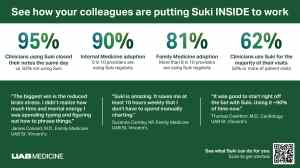
Suki can play an important role in that transition through its ambient AI listening and documentation features, but it’s important for clinicians to build familiarity with this tool and its workflows ahead of go-live.
Read More
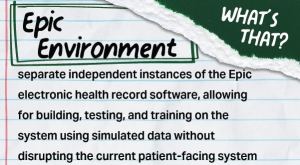
Next in our "What's that?" series, we explain Epic environments. These separate, independent instances of the Epic electronic health record software allow for building, testing, and training on the system without disrupting the current patient-facing system.
Read More
To access Manager Validation, you must have Multifactor Authentication (MFA) configured on your UABMC account. View more details, links, and instructions.
Read More
Feeling overwhelmed by In Basket messages? In just three minutes, the Epic Guys share practical tips to reduce message volume, streamline results management, and use ART Draft Responses to save time during your day.
Read More
Now that all UAB St. Vincent's hospitals and clinics are live on Epic, the Epic Guys share three practical tips to help providers personalize workflows, maximize training resources, and navigate the transition with confidence.
Read More
Please take a moment to review these instructions, reminders, and resources. Remember: No training. No access. No kidding."
Read More
Learn more about recent notable achievements in the Epic community and see creative uses of the software – for clinical user satisfaction, patient self-service, and automation. See the best new applications of AI now and get Epic’s R&D vision for the near and long view.
Read More
When Epic went live across UAB St. Vincent’s locations on July 25, thousands of medical staff and employees began using a new electronic health record (EHR) system for patient care, documentation, scheduling, registration, billing, and other daily work. This transition is now shaping preparations for Wave 2.
Read More
Epic brings several AI-powered tools designed to reduce administrative work and support clinical decision-making. Whether you’re documenting patient encounters, summarizing chart information, or searching for trusted clinical guidance, these tools can help you work more efficiently while keeping you focused on patient care.
Read More