As we get closer to go-live, an important resource for your training is the Playground environment.
Why Playground Matters
Playground is your space to practice. It is a safe, sandbox environment where you can click around, test workflows, and build muscle memory with Epic without any risk to real patient data or live operations. The more comfortable you are navigating Epic before go-live, the smoother your transition will be once you see patients in the live system.
How to Access Playground
You can access Playground at Epic U (EpicU | Dashboard) by selecting the “Access Playground” button, pictured in the image below in the bottom right.
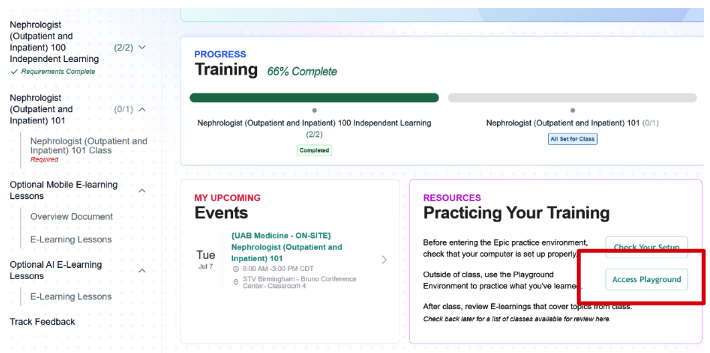
Once you are in, your course guides from 100 independent learnings and 101 class are a great starting point if you would like additional examples or need to find a sample patient to work with. That said, there is no harm in clicking around. Feel free to attempt some of your normal workflows and see what questions come up along the way.
Playground vs. PRD (Production)
It is important to understand the distinction between these two environments:
Playground is for practice only. Nothing you do here is real, there are no real patients, no real orders, and no real documentation. This is the right place to explore, make mistakes, and repeat workflows as many times as you need.
PRD is the live environment. This is where real patient care happens, real orders are placed, and real documentation is created. PRD should not be used for practicing or testing. PRD is where you will create and save your user settings, preferences, and smart phrases.
REMINDER: Everyone that registers will have access to Playground immediately. Access to Playground will continue even after you finish class. After class you will have access to BOTH Playground and PRD.
A Note on User Settings
We recognize that many providers did not have the opportunity to fully build out their user settings during class. If you would like to continue this work, please go to https://citrix.hs.uab.edu, open Hyperspace PRD, and select your UAB login department.
From the Learning Home Dashboard (F1) you can find your User Settings Guides that outline how to complete further User Settings. To find a patient, use patient lookup and search for a patient with last name ZZUSL.
REMINDER: Any user settings you would like to have in place for go-live must be created directly in PRD. Settings are environment specific and cannot be transferred from Playground to PRD. However, if you have access to another Epic instance, you can bring over some user settings using Epic Earth.
If you have any questions about accessing Playground or setting up your preferences, please do not hesitate to reach out. We are here to support you every step of the way.
Thank you for your continued engagement and preparation.
Epic Training
epictraining@uabmc.edu
CMIDO Team
cmidoteam@uabmc.edu